


 FREE Delivery over £35
 Unbeatable Prices

HP Cartridge Protection Explained
Ink cartridge “protection” begins when a cartridge is installed into a HP printer and means that the product can only be used in that particular machine. This limits the ink cartridge to being used in that printer alone and will even prevent it being used in a replacement model if your current printer is unable to be used.
Unfortunately, this protection will render the cartridge useless in other machines, forcing you to throw the cartridge away.
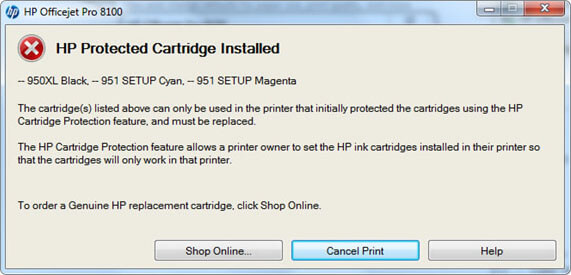
There are a number of ways to prevent the error message shown above from appearing on your laptop or PC.
How to remove a “HP protected cartridge” error
At the moment, the original HP ink cartridges used in the printers affected by this error are relatively new on to the market. As a result, our trusted suppliers of compatible cartridges have been unable so far to replicate the chip technology required to make a low cost alternative.
Replacing the chip on your original HP ink cartridge will prevent this issue although we understand customers may be unable to carry this out. You can always follow our returns process and contact Cartridge People’s Customer Services team for further advice (020 3001 0234).
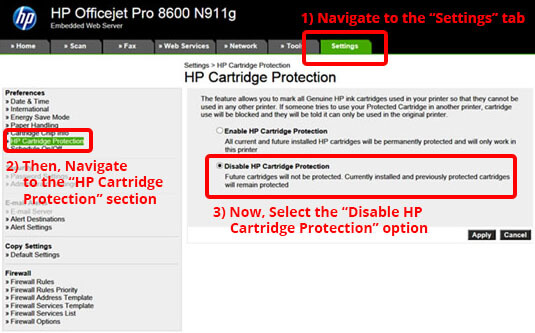
Preventing the error message from appearing in the first place can be achieved by disabling the genuine cartridge protection feature in your printer settings.
Should you have a printer that’s not connected to the internet, you can go to “settings” on the printer menu and simply select the “disable cartridge protection” option available.
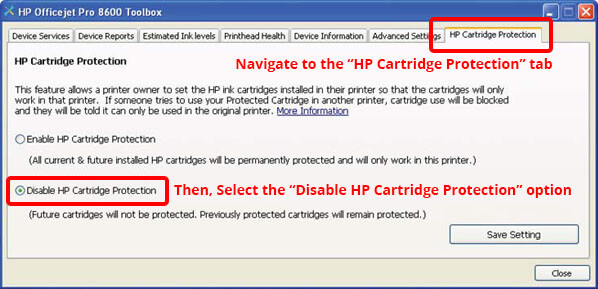
Alternatively, if your printer has internet connectivity you can open up a browser on a PC or laptop and type in your printer’s IP address. From there, you can browse to the “settings” option.
Our industry experts are currently working with suppliers to get this issue resolved and appreciate your patience whilst we source low cost alternative cartridges which can be used in these machines. Don’t forget, you can get the best deals on genuine HP ink cartridges by subscribing to our email newsletter!