


 FREE Delivery over £35
 Unbeatable Prices
Epson T580 Chip Installation Guide
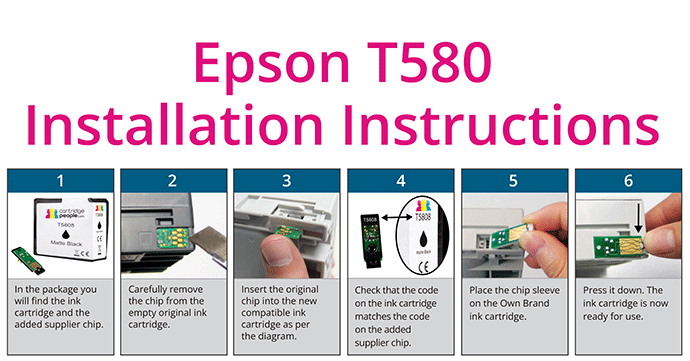
Have you recently bought a Cartridge People Compatible Own Brand Epson T580 ink cartridge from us? This guide will explain how to use the chip from your old original cartridge in your new Compatible Own Brand ink cartridge. Here you’ll also be able to download our Epson T580 chip installation sheet.
The installation guide contains step-by-step instructions which must be followed in order to install the cartridge successfully.
First of all, you’ll need the empty original Epson T580 ink cartridge you are replacing, as you will need its chip.
Please Note: The cartridge box contains your cartridge and a separate chip. This chip may be at the bottom of the box, so please open the box carefully.
Please read the guide below or download our Epson T580 installation sheet to begin printing using our high-quality Compatible Own Brand ink cartridges.
Epson T580 Chip Installation Sheet
Download Epson T580 Chip Installation Sheet- In the package you will find both the compatible Epson T580 ink cartridge and the included supplier chip.
- Carefully remove the chip from the original empty ink cartridge.
- Insert the original chip into the new compatible ink cartridge as shown in the diagram on the installation sheet.
- Please ensure that the code on the ink cartridge matches the code on the added supplier chip.
- Place the chip sleeve on the Compatible Own Brand ink cartridge.
- Press it down. The Cartridge People Compatible Own Brand Epson T580 ink cartridge is now ready to use.
Please note that the ink cartridge itself has an instruction on the side which says ‘Epson T850’ instead of ‘Epson T580’. This can be ignored, it is still an Epson T580 ink cartridge.
In the unlikely event that you experience any issues when using these ink cartridges, please take a look at our FAQs page or, alternatively, contact our Customer Service team.
Office Supplies from Cartridge People
At Cartridge People, we carry an incredibly varied amount of office products – everything from tea and coffee to dollies and skates. Our bread and butter, however, is toner and ink products. We are the largest provider of printing products in the UK. So, whether you’re looking for Xerox printer cartridges, Canon ink or ink cartridges for Epson printers, you’ll find what you’re looking for at Cartridge People.
About The Author
